
Ask ChatGPT “who’s the best accountant for a small business?” and you won’t get ten blue links. You’ll get two or three names, maybe a line about each, and that’s it. The person asking often calls one of those names and never looks further.
If your business isn’t one of them, you’re not on page two. You’re simply not there.
The good news: ChatGPT isn’t picking at random, and you can’t buy your way in. It recommends businesses it can find, understand and trust. All three are things you can work on.
To get ChatGPT to recommend your business, first set up tracking so you know where you stand. Then make sure ChatGPT can read your website, say plainly what you do and for whom, keep your business details the same everywhere online, and get mentioned on the sites ChatGPT already reads, such as review sites, “best of” lists and industry articles. Check the same questions every month and fix the gaps.
The rest of this guide walks through each step in order, with what I actually do for clients and what I’d skip. A fair warning: some steps get a bit technical, with things like analytics settings, robots.txt and schema code. If that’s not your thing, read for the idea and hand those parts to your web developer, or book a free call and I’ll walk you through them.
How ChatGPT decides which businesses to recommend
ChatGPT has two ways of knowing about your business.
- What it already learned. ChatGPT was trained on a huge amount of the public web. If your business was talked about often and consistently before that training happened, ChatGPT may “know” you without looking anything up. You can’t change this quickly. It builds up over years of being mentioned.
- What it looks up live. For most “who should I hire” or “best X for Y” questions, ChatGPT searches the web, reads a handful of pages and writes an answer from them. This part you can influence within weeks, because it depends on what’s on the web right now.
Either way, ChatGPT is looking for agreement. If your website, your reviews, your directory listings and the articles that mention you all tell the same story about what you do, who it’s for and why you’re good at it, ChatGPT can repeat that story with confidence. If they disagree, or you only appear on your own website, it plays safe and names someone else.
This is also why most of the work happens off your website. An Ahrefs study of 75,000 brands found that brand mentions across the web were linked to AI visibility about three times more strongly than backlinks were (0.664 vs 0.218). A follow-up study covering ChatGPT found the same pattern, with YouTube mentions linked most strongly of all. These are correlations, not proof, but the direction is clear: ChatGPT recommends the businesses other people talk about.
Being cited is not the same as being recommended
This is the mistake I see most often when businesses start tracking AI.
When ChatGPT answers a question, it often shows a list of sources underneath. It’s tempting to celebrate when your website shows up there. But a citation only means ChatGPT read your page. It doesn’t mean it recommended you. ChatGPT can use your blog post to explain a topic and then name three of your competitors as the businesses to call.
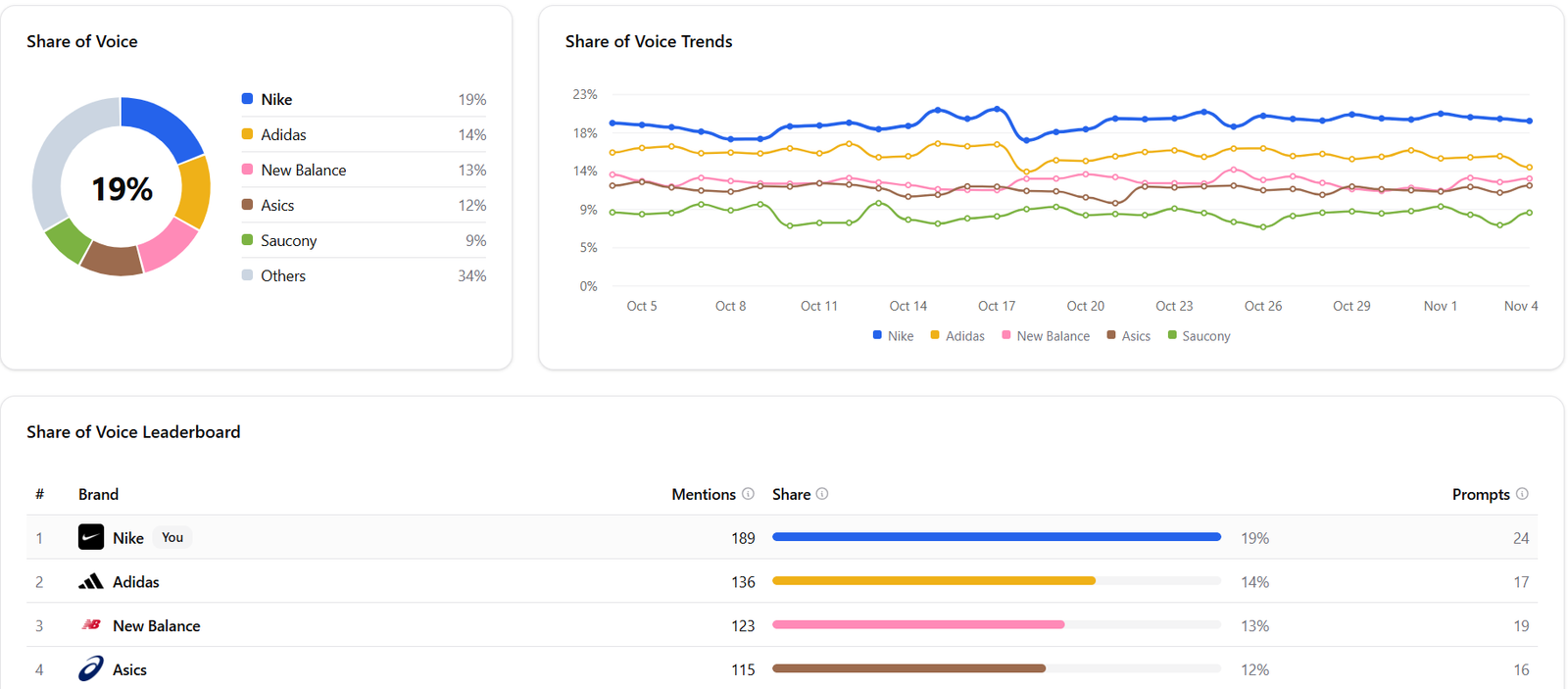
The number I care about is share of voice: out of all the questions your customers might ask, how often does ChatGPT actually name your business, and how often does it name your competitors instead? That’s the metric that turns into enquiries, and it’s the one this guide is built around.
Step 1: Set up tracking before you change anything
Most guides leave measurement until the end. I start with it, because if you don’t know where you stand today, you’ll never know whether anything you do is working.
You want two baselines: visits from ChatGPT and enquiries from ChatGPT.
Visits from ChatGPT (Google Analytics 4)
- Since May 2026, GA4 has a built-in AI Assistant channel that groups visits from tools like ChatGPT automatically. Go to Reports → Acquisition → Traffic acquisition and look for the “AI Assistant” row.
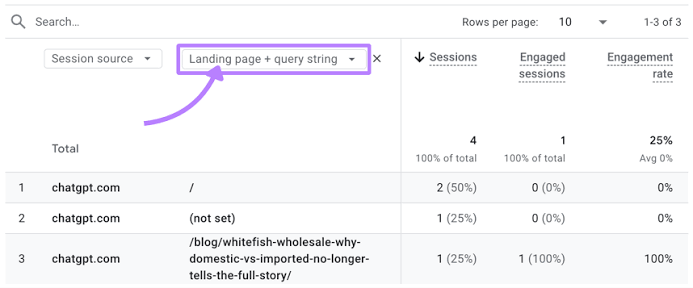
- The built-in channel is a floor, not the full number. It only starts counting from the day it went live and misses some visits. For a fuller picture, also search the Session source / medium report for “chatgpt”. When ChatGPT links to a site it often adds
utm_source=chatgpt.comto the link, so those visits show up under that name. - If you have a developer, ask them to create a custom channel group in GA4 (Admin → Data display → Channel groups) that matches chatgpt.com and chat.openai.com, placed above “Referral”.
Enquiries from ChatGPT
Visits are only half the picture. You also want to know which enquiries came from ChatGPT.
For most enquiries you can track this. WhatsApp messages, contact form submissions and email leads can all be tied back to the source of the visit that started them. Phone calls are the exception: people often read ChatGPT’s answer and then just ring you, so the only way to know is to ask.
- On calls, ask “How did you hear about us?” and note ChatGPT / AI search as an option in your CRM.
- Log your ChatGPT enquiries monthly next to your GA4 numbers. This is your baseline.
Step 2: Find the questions your customers ask, and measure your share of voice
Next, work out what your customers actually type into ChatGPT. Don’t guess. Ask your sales team or look at your enquiry emails. You’ll usually find questions like:
- “Best [service] for [type of business]”
- “[Your company] vs [competitor]”
- “How much does [service] cost and who should I hire?”
- “What should I look for in a [service] provider?”
Add problem-first questions too, like “I’m facing [problem], what should I do?”. Many people start there, not with “who should I hire” (more on this in Step 4). Write down 20–30 of these. This becomes your fixed prompt list. Keep it the same every month, otherwise you can’t compare results.
Then measure how often ChatGPT names you for each one. You can do it by hand: open a fresh chat, ask each question, and record who gets named. ChatGPT’s answers change from one run to the next, so ask each question two or three times and go with the majority.
This gets tedious quickly, so I use an AI visibility tool. Personally I use Elmo, which is open source. It runs your prompt list for you, shows your share of voice against competitors and shows which websites ChatGPT pulls its answers from. Otterly.AI and similar tools do the same job. Which tool you use matters less than running the same prompts every month.
That last part, which websites ChatGPT pulls from, is gold. It’s the list of places you need to be mentioned (Step 6).
Step 3: Make sure ChatGPT is allowed to read your website
This takes five minutes and is surprisingly often broken.
OpenAI uses separate bots for separate jobs. The one that matters here is OAI-SearchBot. According to OpenAI’s own documentation, sites that block OAI-SearchBot won’t be shown in ChatGPT’s search answers. A different bot, GPTBot, collects content for training. You can block one and allow the other.
Ask whoever manages your website to check your robots.txt file (yourdomain.com/robots.txt). If you want to appear in ChatGPT’s answers but would rather your content isn’t used for training, it would look like this:
User-agent: OAI-SearchBot
Allow: /

User-agent: GPTBot
Disallow: /
Two more things to check:
- Your firewall or CDN. Services like Cloudflare can block AI bots even when robots.txt allows them. Check the bot settings.
- Content that needs JavaScript to appear. If your prices or service details only load after the page runs scripts, bots may see a blank page. Key information should be in the page’s plain HTML.
OpenAI says changes to robots.txt take about 24 hours to take effect.
Step 4: Say clearly what you do, for whom, and what it costs
ChatGPT can’t recommend you for “commercial cleaning for offices” if your homepage says “We deliver excellence in every space.” It needs plain facts it can repeat.
For each main service, have one page that answers, near the top and in plain words:
- What exactly you do
- Who it’s for (business size, industry, situation)
- Where you work, if that matters
- Roughly what it costs, or what the price depends on
- How long it takes and what the process looks like
- Why someone should pick you over the alternatives
Two writing habits help a lot:
- Lead with the answer. Open each section with a one- or two-sentence answer, then explain. ChatGPT lifts short passages, not whole pages.
- Use your business name, not “we”. A paragraph that says “our solution is ideal for this” means nothing once it’s lifted out on its own. “[Your Business] helps mid-sized manufacturers…” still makes sense.
Publish honest comparison and “how to choose” content too. People ask ChatGPT “X vs Y” all the time, and a fair comparison on your site gives it something to work with.
Don’t forget problem-first questions
Many people never ask ChatGPT “who’s the best [service]?” They describe a problem instead: “my website traffic dropped and I don’t know why” or “my water heater keeps tripping the switch”. ChatGPT usually suggests a few things to try first. Only when those don’t work does it say something like “at this point, you should get a professional”, and that’s when it names businesses.
So publish content for that journey as well as for the “best X” questions:
- Explain the common problems you solve in plain words, including what people can try themselves.
- Say honestly when it’s time to call a professional, and what that professional should check. That’s the point in the conversation where ChatGPT starts looking for someone to recommend.
- Connect the problem to your service, so ChatGPT can link “this problem” to “this business fixes it”.
It can feel odd to give away the DIY fixes, but that’s what makes you the obvious name when the DIY fixes run out.
Step 5: Keep your business details the same everywhere
If your website says one thing, your Google Business Profile says another and an old directory listing has your previous address, ChatGPT gets mixed signals.
- Use the exact same business name, address, phone number and short description on your website, Google Business Profile, Bing Places, LinkedIn, social profiles and industry directories.
- Claim Bing Places and Bing Webmaster Tools. ChatGPT’s live search is widely reported to rely heavily on Bing, so being properly listed there is cheap insurance.
- Fill in your Google Business Profile completely (categories, services, hours, photos) if you serve customers locally.
- Add Organization schema to your website. This is a small block of code that states your business facts in a format machines read easily, and links your official profiles together. A basic version:
<script type="application/ld+json">
{
  "@context": "https://schema.org",
  "@type": "Organization",
  "name": "Your Business Name",
  "url": "https://www.yourdomain.com",
  "logo": "https://www.yourdomain.com/logo.png",
  "description": "One plain sentence on what you do and for whom.",
  "sameAs": [
    "https://www.linkedin.com/company/your-business",
    "https://www.facebook.com/yourbusiness"
  ]
}
</script>
If you serve customers in a specific area, use the LocalBusiness type (or a more specific one such as Dentist or AccountingService) and add your address and opening hours.
What about llms.txt? You’ll see a lot of advice telling you to add an llms.txt file to your site. I wouldn’t spend much time on it. Google’s Gary Illyes has said Google doesn’t support it, and John Mueller has compared it to the old keywords meta tag. It won’t hurt to have one, but it won’t get you recommended either. Your time is better spent on Steps 4 and 6.
Step 6: Get mentioned on the sites ChatGPT already reads
This is the step that moves the needle most, and the one most businesses skip.
Go back to the sources list from Step 2. For the questions where competitors get named and you don’t, look at which websites ChatGPT pulled its answer from. Those are your targets. They usually fall into a few groups.
- “Best of” lists and comparison articles. Articles like “10 best [service] providers for [industry]” are one of the most common things ChatGPT reads. Ahrefs found that “Best X” list pages made up 43.8% of the pages ChatGPT cited in its research. Find the lists ChatGPT cites for your questions, then contact the authors with a short, useful pitch: what you do, who for, and something concrete (a price range, a result, a feature) they can add.
- Review sites. Get a steady flow of genuine, detailed reviews on the sites that matter in your industry: Google for local businesses, G2 or Capterra for software, Trustpilot for ecommerce, and industry-specific platforms where they exist. Steady and recent beats a big batch once a year. Reply to reviews too, including the bad ones. For local businesses the numbers are stark: according to research summarised by Eclincher, businesses that ChatGPT and Perplexity recommended averaged 133 Google reviews, against 11 for those they ignored.
- Industry articles and podcasts. Being quoted in a trade publication, appearing on an industry podcast or contributing a useful article gets your name onto pages ChatGPT trusts.
- Communities. Reddit threads, LinkedIn discussions and industry forums where your buyers ask for advice. Answer properly, as yourself, and only mention your business where it genuinely fits. Overt promotion gets removed and helps no one.
- YouTube. In the Ahrefs follow-up study, YouTube mentions had the strongest link with AI visibility of anything measured (around 0.74). That includes being reviewed or mentioned on other people’s channels, not just your own.
Step 7: Re-check every month and fix the gaps
Getting recommended isn’t a one-off job. ChatGPT’s answers change, competitors work on this too, and new sources appear.
Once a month:
- Run your fixed prompt list (by hand or in your tracking tool).
- Record your share of voice and your competitors’.
- Check GA4 and your “How did you hear about us?” data.
- For questions where you’re missing, look at the sources ChatGPT used and pick one or two to work on.
- If ChatGPT says something wrong about you (old prices, a service you’ve dropped), find where it’s coming from and fix it at the source: your own pages, your listings, or the article that’s out of date.
Judge progress over a quarter, not a single month. One month’s numbers bounce around too much to mean anything.
If you’d rather have someone run this for you, this is what my GEO service covers.
What doesn’t work
- Paying ChatGPT. ChatGPT now shows ads in some countries, but OpenAI says ads run on a separate system and advertisers can’t shape, rank or change ChatGPT’s answers. An ad can sit below an answer. It can’t put you in one.
- Anyone who guarantees a recommendation. Nobody controls ChatGPT’s answers. If an agency promises you’ll be “the #1 recommendation”, they’re guessing.
- Fake reviews and self-written “best of” lists. ChatGPT looks for agreement across independent sources. A list on your own site ranking yourself first isn’t independent, and fake reviews are a legal and reputational risk.
- Chasing citations instead of recommendations. As covered above, being listed as a source doesn’t mean being named as the answer. Track share of voice.
- Checking once. Answers vary between runs. One check tells you very little. A fixed list checked monthly tells you a lot.
What to do first if you’re short on time
| Order | Task | Time | Why first |
|---|---|---|---|
| 1 | Set up GA4 tracking and a “How did you hear about us?” field | 1 hour | Without a baseline, you can’t tell what’s working |
| 2 | Check robots.txt and firewall settings for OAI-SearchBot | 15 minutes | If ChatGPT can’t read your site, nothing else on it counts |
| 3 | Write your prompt list and run it once | 2 hours | Shows where you’re missing and which sources to target |
| 4 | Fix your main service pages so they say what, who, where and how much | 1–2 days | Gives ChatGPT plain facts to repeat |
| 5 | Make your details consistent across listings and add Organization schema | Half a day | Removes mixed signals |
| 6 | Start earning reviews and mentions on the sources ChatGPT cites | Ongoing | The biggest long-term lever |
How long does it take?
The technical fixes (Steps 3–5) can show up within weeks, because ChatGPT’s live search reads the web as it is now. Earning mentions and reviews (Step 6) is slower. Expect three to six months before you see a steady change in share of voice. Changes to what ChatGPT “already knows” from training take longer still, and you can’t control when its training data is refreshed.
The businesses that win here are rarely the ones with the cleverest trick. They’re the ones that keep at it every month.
Frequently asked questions
Can I pay to get ChatGPT to recommend my business?
No. ChatGPT shows ads in some countries, but OpenAI says ads don’t influence its answers and advertisers can’t change what it says. The only way in is to improve what the web says about you.
How do I know if ChatGPT is recommending my business?
Run a fixed list of 20–30 questions your customers ask, two or three times each, and record who gets named. An AI visibility tool such as Elmo or Otterly.AI can automate this. Also check GA4’s AI Assistant channel and ask new enquiries how they found you.
Why does ChatGPT recommend my competitor and not me?
Usually because your competitor is mentioned on more of the sites ChatGPT reads (review sites, “best of” lists, industry articles), or because their website explains what they do more clearly. Look at the sources ChatGPT cites for that question and you’ll normally see why.
Does being cited by ChatGPT mean it’s recommending me?
Not necessarily. A citation means ChatGPT read your page. A recommendation means it named your business as the one to choose. Track how often you’re named (share of voice), not just how often you’re cited.
Do I need an llms.txt file?
It won’t hurt, but it won’t make ChatGPT recommend you. Google has said it doesn’t use llms.txt, and there’s no good evidence it helps. Spend the time on your service pages and on earning mentions instead.
How long does it take for ChatGPT to start recommending a business?
Technical fixes can show up in weeks. A real change in how often you’re recommended usually takes three to six months of steady work on reviews and mentions.
Sources
- Overview of OpenAI crawlers — OpenAI
- Ads in ChatGPT — OpenAI Help Center
- AI Overview brand visibility factors (75K brands) — Ahrefs
- Top brand visibility factors in ChatGPT, AI Mode and AI Overviews — Ahrefs
- YouTube mentions predict AI citations better than backlinks — Something Inc. (summary of Ahrefs research)
- GA4 just gave AI traffic its own channel — SEO Sherpa
- Google says llms.txt won’t be used — Search Engine Land
- Google’s llms.txt guidance depends on which product you ask — Search Engine Journal
- How do I get my business recommended by ChatGPT? — Eclincher (source of the SOCi and Insites figures)
- Elmo: open-source AI visibility tracking — GitHub